Affiliate disclosure: This article may contain affiliate links. If you follow a link and make a purchase, the publisher may earn a commission at no extra cost to you.
Mobile Pixels Portable Monitor Review: Range, Pricing and Who It Suits
Mobile Pixels at a Glance
Mobile Pixels is a monitor brand that sells through its US store at mobilepixels.us. Its homepage groups the catalogue into three broad areas: portable monitors, desktop monitors and accessories. Portable monitors are further split by format into tri-screen, dual-screen and stand-alone screens. Desktop monitors cover stacked, gaming and single-monitor options. Pixcase and Pixframe each get their own top-level category.
This guide is built entirely from the merchant's public pages: the homepage, the all-products collection and the Duex DS Series product page. We have not tested any Mobile Pixels monitor, and nothing here should be read as a hands-on result. Where a figure or claim appears, it is attributed to the merchant, and where the pages cannot answer a question, we say so.
The aim is to give you a clear picture of what the brand sells, what it says about price, shipping, warranty and returns, and which questions you should still answer yourself before ordering. If you are comparing Mobile Pixels with other portable monitor brands, the later sections set out criteria you can check against any alternative.
Shop Mobile Pixels Portable Monitor Review: Range, Pricing and Who It Suits →
The Product Range Explained
The merchant's navigation lists the product families clearly, which makes the range easy to summarise.
Portable monitors
- Tri-screen: the Trio 3 Pro (1400p), part of the Trio 3 Series.
- Dual-screen: the Duex Float 2 Pro and the Duex DS Series.
- Stand-alone screens: the Glance 16 inch and the Fold in 15.6 inch and 16 inch versions.
Desktop monitors
- Stacked: Geminos X, listed as two 24 inch stacked monitors.
- Gaming: a 45 inch DQHD gaming monitor.
- Mini LED: 34 inch and 27 inch models.
- Single monitors: a 27 inch UHD and a 23.8 inch FHD model.
The store also lists a 27 inch Pixcase and a 23.8 inch Pixframe as separate categories. The accessories section covers items for portable monitors and laptops, including hubs and adapters, cables, keyboards and mice, a portable locator, a laptop and monitor riser and a conference speaker.
The all-products collection showed 67 products when captured, including items such as the Levstand, laptop monitor data cables and 8K HDMI and DisplayPort cables. For specifications, the only model covered in detail by the pages we reviewed is the Duex DS Series, so details for every other model need to be checked on its own product page.
Duex DS Series Specifications and Pricing
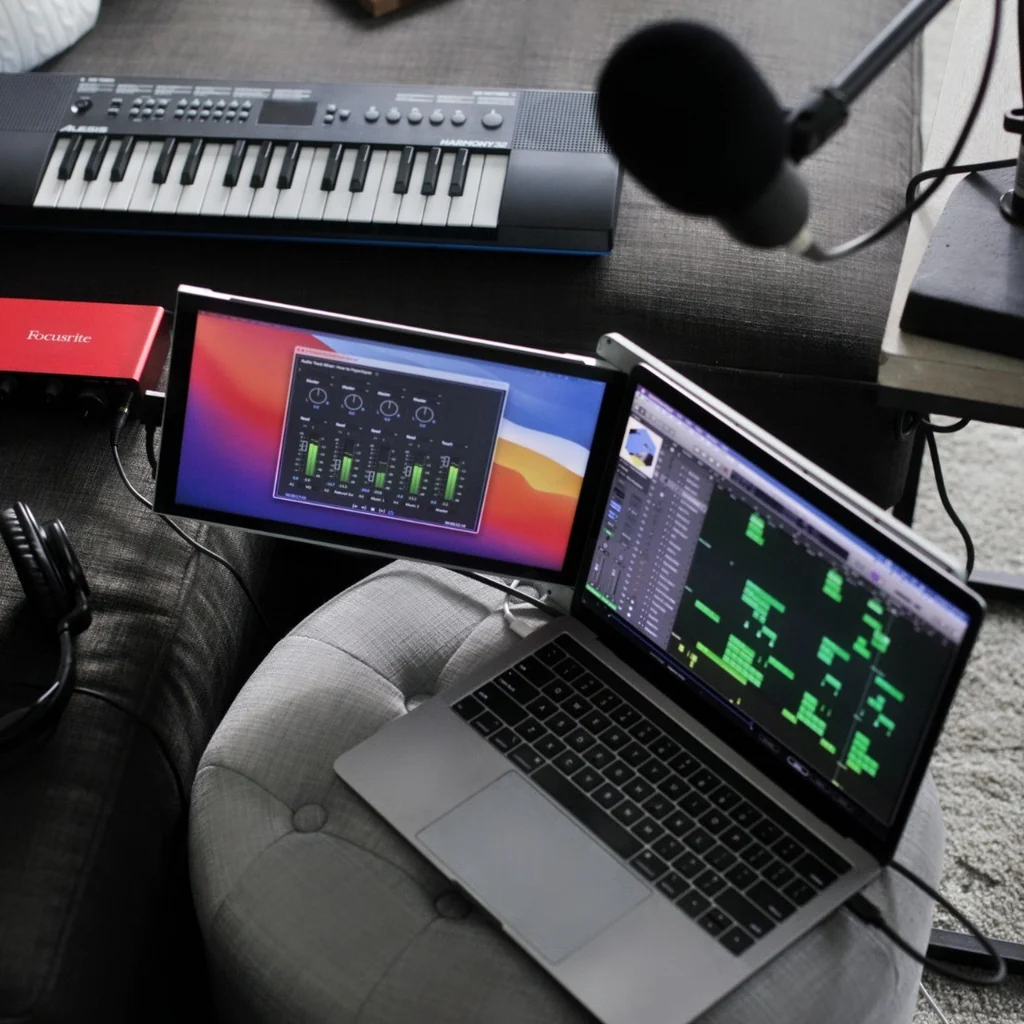
The Duex DS Series is a dual-screen portable monitor, and its product page is the one page we examined in detail. Everything below is as stated by the merchant.
- Sizes: two screen sizes, 13.3 inch and 14.1 inch.
- Price: the page showed a sale price of $269.99 USD against a regular price of $299.99 USD at the time of capture.
- Connection: plug and play via USB-C or Mini HDMI.
- Compatibility: macOS, Windows, Nintendo Switch and Samsung DeX.
- Display features: four viewing modes and an eye-care mode.
- Design: described as slim and lightweight.
- Productivity: the page says it can boost productivity by up to 50%.
The productivity figure is a marketing claim. The page excerpt we reviewed gives no testing method behind it, and we have not verified it. The same applies to the eye-care mode: it is a listed feature, and we make no claim about its effect on comfort or health.
The page also offers an "Add Extended Warranty" option and mentions a trade-in programme, so the final cost of ownership can differ from the headline price. Because the listed price is a sale price, check the live Duex DS Series page for the current figure before you decide.
Where Mobile Pixels Stands Out
These are strengths as the merchant presents them, not results from testing.
Breadth of format. The catalogue spans single, dual and tri-screen portable monitors as well as several desktop monitor lines. If you already know you want a particular layout, such as a second screen attached to a laptop or a third, the range is organised around that choice.
Stated cross-platform compatibility. The Duex DS Series page lists macOS, Windows, Nintendo Switch and Samsung DeX. For anyone who wants one portable screen for a laptop and a console, that is a useful claim to check against your own devices.
Purchase protection. The store displays a protection plan that it says covers accidental damage such as breaks and drops, plus power surges and electrical failures, with hassle-free replacements at no additional cost. The plan is described as running through your chosen coverage term, and it appears alongside an extended warranty add-on.
Accessories in one place. Cables, hubs and adapters, stands and keyboards and mice are sold in the same store, so you can buy supporting items with the monitor rather than searching elsewhere.
None of these points is a ranking against other brands. They describe what the merchant offers and how it presents it.
Limitations and Open Questions
A guide built from merchant pages can only go so far. Here is what you cannot conclude from the evidence we used.
- No independent testing. We present no hands-on measurements of brightness, colour accuracy, build quality or battery life. Anything on those topics must come from other sources.
- Unverified marketing claims. The "up to 50%" productivity claim and the eye-care mode are merchant statements. We have not verified them.
- Time-limited pricing. Prices and promotions on the captured pages are tied to sales and countdown offers, and they may have changed since.
- One model in detail. Only the Duex DS Series page was examined for specifications. The Trio 3 Pro, Duex Float 2 Pro, Glance, Fold and desktop models each need separate checking.
- Extra costs. The optional protection plan and the extended warranty add cost beyond the listed price. The pages we reviewed did not show the cost of those add-ons.
- No competitor data. We hold no information on other brands, so we make no claims about how Mobile Pixels compares on price or performance.
Treat this guide as a map of what the merchant states, and verify the details that matter most to you before buying.
Price, Shipping, Warranty and Returns
The homepage banner states the following terms:
- Shipping: free US shipping, and free Canada shipping over $200 CAD.
- Warranty: a 2-year warranty.
- Returns: 30 day returns, described as guaranteed.
Promotions appeared on the captured pages. The homepage carried a Columbus Day sale, and the Duex DS Series page showed an offer to upgrade your workspace this autumn with a countdown timer. Offers like these are time-limited, so the price you see today may not be the price next week.
The all-products collection showed accessories at discounted prices when captured. The Levstand was listed at a $16.99 USD sale price against a $34.99 USD regular price. The laptop monitor data cable and the 8K HDMI cable were each listed at $17.84 USD against $29.99 USD.
The store navigation also lists a student discount and a certified refurbished section. If either applies to you, check the student discount and certified refurbished pages on the Mobile Pixels site for the terms. Shipping, warranty and returns wording can change, so confirm the details on the current page at checkout.
Shop Mobile Pixels Portable Monitor Review: Range, Pricing and Who It Suits →
Comparing Mobile Pixels With Practical Alternatives
We have no competitor data, so we cannot tell you whether another brand is cheaper or better. What we can do is suggest criteria that make any comparison fair. Collect the same details for each monitor you are considering:
- Screen size and panel resolution. Compare like with like, for example 1400p on the Trio 3 Pro against the resolution of any rival.
- Connection type. Check whether the monitor needs USB-C video output, Mini HDMI or another port, and whether your laptop provides it.
- Weight and stand design. These matter most if you plan to carry the monitor.
- Platform compatibility. Mobile Pixels lists macOS, Windows, Nintendo Switch and Samsung DeX for the Duex DS Series. Check what alternatives state.
- Warranty length and return window. Mobile Pixels states a 2-year warranty and 30 day returns, which gives you benchmarks to hold other brands against.
- Total cost. Include protection plans, extended warranties, cables and stands.
Multi-screen formats are the clearest differentiator in this catalogue. Whether a dual or tri-screen layout is worth having depends on your workflow, and a single stand-alone screen may be enough for many people. To compare formats within the brand, start with the portable monitors category on the Mobile Pixels site, then verify the current specifications and prices of any alternative before you decide.
Who Mobile Pixels Suits
These are fit suggestions drawn from what the merchant states, not verdicts from testing.
- Remote workers and travellers may be drawn to the slim, lightweight, plug-and-play positioning stated for the Duex DS Series.
- Console and Samsung DeX users may value the stated compatibility with Nintendo Switch and Samsung DeX.
- Desk-based buyers who want a fixed setup can look at the stacked, ultrawide and Mini LED desktop lines, such as Geminos X, the 45 inch DQHD gaming monitor and the 34 inch and 27 inch Mini LED models.
- Students may want to check the student discount listed in the store navigation.
Fit still depends on factors the merchant pages cannot confirm. Desk space, the ports on your laptop, how you work and how far you travel with the screen all affect whether a given model suits you. Weigh these against the specifications on the product page rather than relying on the positioning alone.
How to Choose and When to Buy
A few steps will narrow the range quickly.
- Pick a format first. Decide between a single, dual or tri-screen portable monitor, or a desktop monitor, then confirm the size.
- Check your ports. Confirm that your laptop or device supports USB-C video output or Mini HDMI before buying.
- Compare sale and regular prices. Note both figures and check how long a promotion runs.
- Read the terms before adding extras. Look at the protection plan terms and the warranty before you add an extended warranty or other extras.
- Check the return window. Confirm the return policy on the current page at checkout.
For a wider view of the catalogue, including accessories, browse the all-products collection. Because promotions on the captured pages were seasonal, it is worth checking the live site for any current offer before you order.
Frequently Asked Questions
What sizes and connection options does the Mobile Pixels Duex DS Series offer?
The product page lists two screen sizes, 13.3 inch and 14.1 inch. It states that the monitor is plug and play via USB-C or Mini HDMI. At the time of capture, the page showed a sale price of $269.99 USD against a regular price of $299.99 USD. Check the live page for current pricing.
What shipping, warranty and return terms does Mobile Pixels state?
The homepage states free US shipping, free Canada shipping over $200 CAD, a 2-year warranty and 30 day returns. These terms come from the merchant and may change, so confirm them on the current page at checkout.
Which devices does the Duex DS Series say it works with?
The page lists compatibility with macOS, Windows, Nintendo Switch and Samsung DeX. Whether your own device can output video over USB-C or Mini HDMI is something to confirm before buying.
Does this guide include hands-on testing of Mobile Pixels monitors?
No. This guide is based on the merchant's public pages and includes no independent testing or measurements. The productivity claim of up to 50% and the eye-care mode benefits come from the merchant and have not been verified here.
Does Mobile Pixels offer discounts or protection plans?
The store lists a student discount and a certified refurbished section in its navigation, and seasonal promotions appeared on the captured pages. It also displays a protection plan covering accidental damage and power surges, and the Duex DS Series page offers an extended warranty add-on. Read the terms and check the cost of any add-on before purchase.
Editorial information: About our editorial team · Read our editorial policy · Read our affiliate disclosure.
Shop Mobile Pixels Portable Monitor Review: Range, Pricing and Who It Suits →